
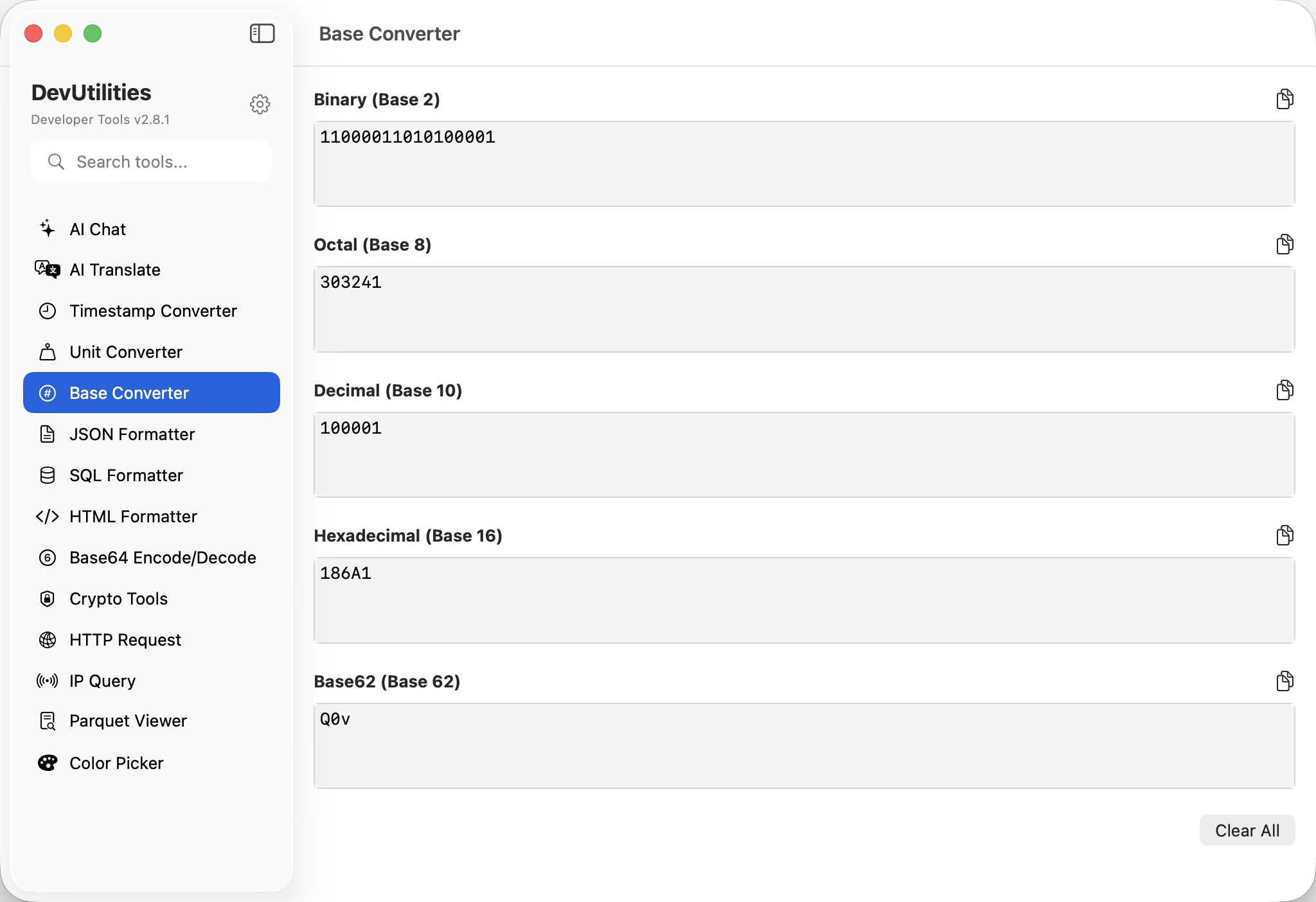
Base Converter Seamless Number System Conversion

Convert numbers between binary (base 2), octal (base 8), decimal (base 10), and hexadecimal (base 16) number systems with real-time validation. Features instant mutual conversion, input validation with clear error messages, and intelligent number base detection. Essential for low-level programming, computer science education, and digital system design.

🔄 4-Way Conversion
Real-time Validation
Instant Results
DevUtilities Base Converter Screenshot showing mutual conversion between binary, octal, decimal, and hexadecimal with validation

Advanced Base Conversion Features

Everything you need for professional number base conversion and numeric system translation workflows.

Input Validation

Real-time validation ensures only valid characters for each base: 0-1 for binary, 0-7 for octal, 0-9 for decimal, 0-9 and A-F for hexadecimal.

⚠️

Clear Error Messages

Descriptive error messages help you understand what went wrong with invalid input and provide suggestions for correction.

Real-time Processing

Instant conversion as you type with live synchronization across all number bases. No need to click conversion buttons or wait for results.

💾

State Persistence

Your last conversion is automatically saved and restored when you reopen the tool, ensuring continuity in your workflow.

🎯

Precision Handling

Accurate conversion handling for large numbers with proper overflow detection and precise representation across all bases.

📋

Easy Copy & Export

One-click copying of conversion results in any base. Integrate seamlessly with code editors and development tools.

🔍

Smart Detection

Intelligent detection of active input field prevents conversion loops and ensures smooth user experience during data entry.

Supported Number Systems

Understanding the four fundamental number bases used in computing

Octal (Base 8)

Octal Number System

Decimal: 42
Octal: 52

Digits: 0-7

Use for: Unix file permissions, legacy systems, compact binary representation

Best for: File permission notation (chmod), older embedded systems, compact notation

Decimal (Base 10)

Decimal Number System

Hex: 2A
Decimal: 42

Digits: 0-9

Use for: Human-readable numbers, general calculations, everyday computing

Best for: Standard arithmetic, user interfaces, data display, general purpose

How to Use Base Converter

Convert between number bases in just a few simple steps.

1

Enter Your Number

Type a number in any of the four input fields: binary (0-1), octal (0-7), decimal (0-9), or hexadecimal (0-9, A-F).

2

See Auto-Conversion

Watch as the tool instantly converts your input to all other number bases in real-time with automatic validation.

3

Check Validation

Invalid characters are automatically detected with clear error messages explaining what's wrong and how to fix it.

4

Copy Results

Copy the converted values with one click and use them in your code, calculations, or documentation.

Perfect for These Development Tasks

💻

Low-Level Programming

Work with binary data, bit manipulation, bitwise operations, and memory addresses in systems programming and embedded development.

🎓

Computer Science Education

Learn number systems, understand digital logic, practice conversions, and master fundamental computer science concepts.

🔧

Digital System Design

Design digital circuits, work with logic gates, create truth tables, and analyze binary signals in hardware design.

🐛

Debugging & Analysis

Inspect memory dumps, analyze register values, decode instruction opcodes, and understand binary data representations.

🎨

Web Development

Convert color codes, work with RGB values, understand hex colors, and manipulate CSS color representations.

⚙️

System Administration

Set Unix file permissions, configure system flags, work with network masks, and handle system-level configurations.

Common Conversion Examples

Converting 255 (decimal) to other bases

Binary: 11111111 (eight 1s)
Octal: 377
Hexadecimal: FF

This is the maximum value for an 8-bit unsigned integer and represents all bits set to 1.

Converting chmod 755 (octal permissions)

Binary: 111101101 (rwxr-xr-x)
Decimal: 493
Hexadecimal: 1ED

Common Unix file permission: owner has full access (rwx), group and others have read and execute (r-x).

Converting color #FF5733 (hexadecimal)

To get the red component (FF):
Decimal: 255 (maximum red intensity)
Binary: 11111111
Octal: 377

Hexadecimal is commonly used in web colors. Each pair represents RGB components (Red-Green-Blue).

Converting binary 10101010 to other bases

Decimal: 170
Octal: 252
Hexadecimal: AA

This alternating bit pattern (10101010) is often used in testing and debugging digital systems.

Why use hexadecimal for memory addresses?

Hexadecimal provides a compact way to represent binary data. Each hex digit represents exactly 4 bits, making it easy to convert: 0xDEADBEEF is more readable than 11011110101011011011111011101111 in binary.

When should I use octal?

Octal is most commonly used for Unix/Linux file permissions (chmod) where each digit represents read-write-execute permissions for owner-group-others. It's also used in some legacy systems and for compact representation of 3-bit values.

Ready to Streamline Your Number Base Conversions?

Join thousands of developers who rely on DevUtilities's base converter for their programming and debugging tasks.

Download Download DevUtilities
✓ macOS 14.0+ ✓ 19 Developer Tools