Six things it does well.
Generate from text
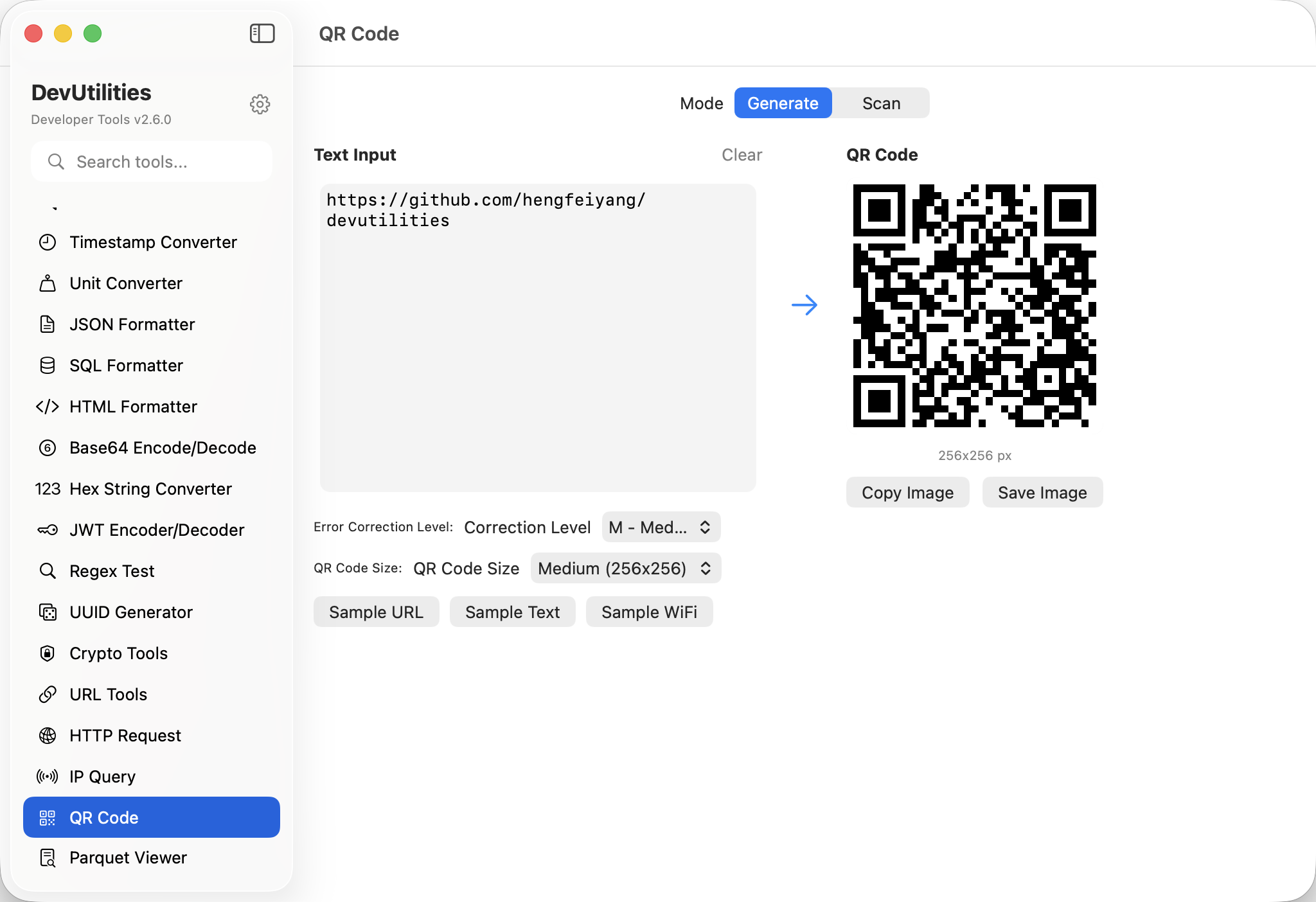
Type or paste; the QR appears immediately. URLs, plain text, or arbitrary strings.
Three sizes
Small, medium, large. Pick the resolution that fits the surface you'll print on or display.
Error correction
L (7%), M (15%), Q (25%), H (30%). Higher levels survive more damage and overlay logos better.
Scan from image
Drag a PNG / JPG into the scan panel; the encoded text appears below.
Save as PNG
Export the generated QR as a PNG for the docs, the print run, the email signature.
One-click copy
Decoded text is copy-ready. The image is one drag away.
Four moves through the QR.
Type text
URL, plain text, or any string. The QR updates as you type.
Pick size and EC
Choose a size; pick an error-correction level; preview updates immediately.
Save or share
Drag the image to a Finder window or save as PNG.
Or scan
Drop a QR image into the scan area; the decoded text appears.
The work it actually does.
WiFi credentials
Encode WIFI: strings for guests; high error correction tolerates phone-camera angles.
2FA setup
Encode otpauth:// URLs for authenticator apps when scripting test accounts.
Marketing assets
Generate a high-EC QR with a logo overlay and ship it on a flyer.
Inspecting screenshots
Drop a screenshot containing a QR; read what it actually contains.
App-store smart links
Encode an App Store URL for posters, kiosks, in-app handoffs.
Bulk generation
Generate test QR codes for fixtures across multiple sizes and EC levels.
Things people ask before they download.
Which error-correction levels are supported?
L (7%), M (15%), Q (25%), and H (30%). Higher levels recover from more physical damage at the cost of code density.
Can I overlay a logo?
The tool generates the bare code; you can overlay a logo in your image editor. Use level Q or H so the overlay doesn't break decoding.
What can it decode?
Any standard QR code in PNG / JPG / TIFF / common image formats. Drag the image into the scan area.
Does it support coloured QRs?
Generated codes are black on white for maximum scanner compatibility. Colour overlays are best handled in an image editor.
Does this require network access?
No. Generation and scanning are fully local.
Maximum capacity?
Standard QR limits — up to about 4296 alphanumeric characters at level L. Practical limits depend on density and EC.