
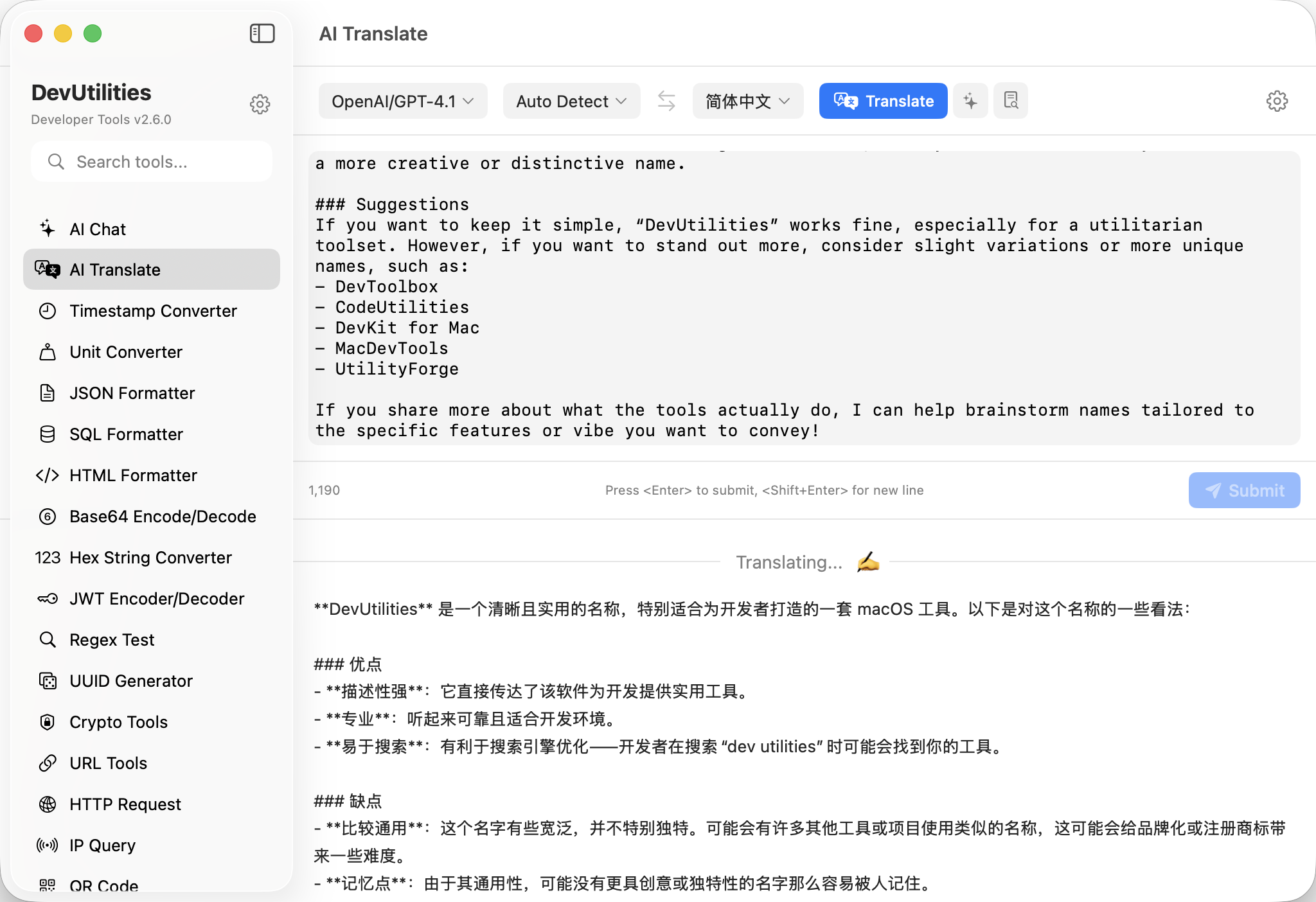
Eight pieces, tightly fitted.
Three operation modes
Translate renders meaning faithfully. Polish rewrites in the same language for clarity and flow. Summarise condenses long passages into the target language.
Nineteen languages
Auto-detect, English, Chinese (Simplified / Traditional), Japanese, Korean, Spanish, French, German, Russian, Arabic, Hindi, Portuguese, Italian, Dutch, Turkish, Vietnamese, Thai, Indonesian.
Word mode
Drop a single word and the output expands: phonetic notation, primary meanings, sample sentences, etymology — a pocket dictionary inline.
OpenAI TTS streaming
Raw PCM streamed straight to AVAudioPlayerNode. Playback starts in ~200 ms; no sentence splitting; thirteen voices.
Native macOS TTS
Fall back to the system voices for any of the nineteen languages — useful offline or when you've blown through your TTS quota.
Real-time streaming
Output streams as the model generates. Live status indicator animates between thinking and done; copy and retry are one click each.
Smart language defaults
Target language is seeded from your system locale on first launch. Override per session; the choice sticks for future runs.
Resizable split view
Source and translation share a split that snaps to a 500 pt cap on input height. Long passages get a scroll, not a clipped box.
Four moves from paste to playback.
Pick a mode & pair
Translate, polish, or summarise. Choose source (or auto-detect) and target.
Paste the text
Single word, sentence, paragraph, or essay. Word mode engages on its own when the input is a single token.
Listen if you'd like
Hit the speaker to hear it. OpenAI TTS streams PCM in real time; the macOS engine handles offline playback.
Copy or retry
One-click copy on the output. Retry re-runs with the same input if you want a second pass.
The work it actually does.
Foreign-language docs
Drop a Mandarin RFC or a Japanese commit message; get faithful English back without leaving the window.
Email and PR rewrites
Polish mode rewrites without translating. Tighten the same paragraph until it reads the way you'd like.
Long threads
Summarise into target language: a Slack debate becomes a paragraph in the language you actually publish in.
Vocabulary, with weight
Word mode returns phonetics, meanings, sentences, etymology. The flashcard you didn't have to make.
Pronunciation practice
OpenAI TTS at native speed. Loop a phrase to learn its prosody, not just its letters.
Marketing copy across markets
Translate first, then polish in the destination language. Two clicks, two passes, one paragraph that reads native.
Things people ask before they download.
Which model handles the translation?
The same protocol-aware model picker AI Chat uses: GPT, DeepSeek, Qwen, Kimi, GLM, or Gemini through an OpenAI-compatible endpoint, and Claude through Anthropic Messages.
What languages are supported?
Auto-detect plus 19 languages: English, Chinese (Simplified & Traditional), Japanese, Korean, Spanish, French, German, Russian, Arabic, Hindi, Portuguese, Italian, Dutch, Turkish, Vietnamese, Thai, Indonesian.
What's word mode?
When the input is a single word, AI Translate switches to a dictionary-style output: pronunciation (IPA where applicable), primary and secondary meanings, two example sentences, and brief etymology.
How does the OpenAI TTS streaming work?
OpenAITTSService hits /audio/speech with raw PCM streaming. Audio is fed directly into AVAudioPlayerNode as it arrives — playback starts within ~200 ms with no sentence pre-splitting.
Can I use macOS voices instead?
Yes. Settings → AI → Text-to-Speech exposes three modes: Auto (prefer OpenAI when reachable), OpenAI only, or macOS only. The macOS engine works fully offline.
Are translations stored anywhere?
No — except in your local session state, so the panel restores on relaunch. Source text and output are sent only to the model endpoint you configured.
Does Polish mode change languages?
No. Polish mode keeps the language of the input and rewrites for clarity and flow. Use Translate if you want a different language.