
Text Compare Professional Side-by-Side Text Diff Tool

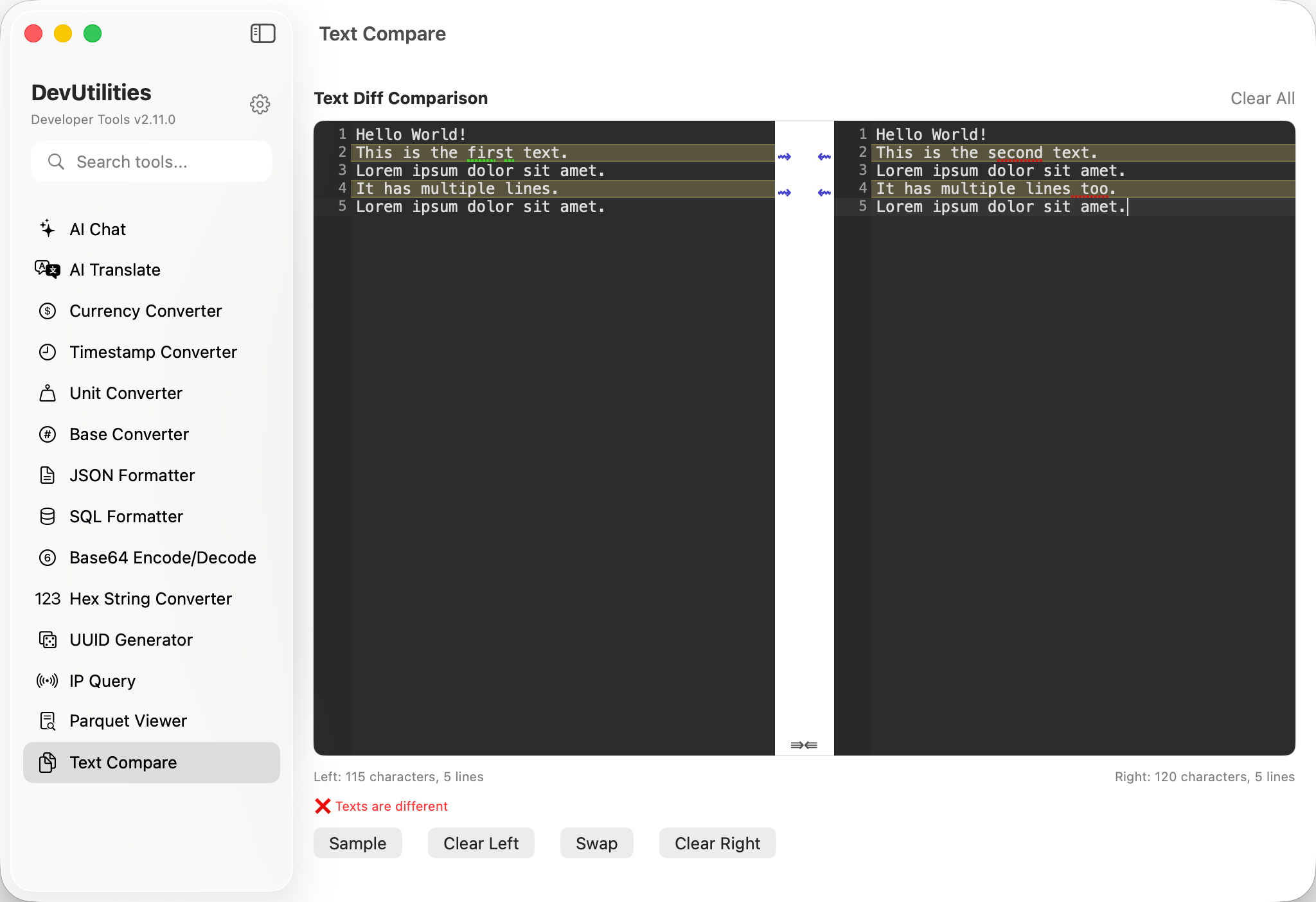
Compare two text documents side-by-side with visual diff highlighting and instant status updates. Perfect for code review, configuration file comparison, and spotting differences between any text files. Native macOS performance with CodeMirror-powered visual diff editor.

Real-time Status
🔍 Visual Diff Highlighting
📊 Character & Line Metrics
DevUtilities Text Compare Screenshot showing side-by-side text comparison with visual diff highlighting

Powerful Text Comparison Features

Everything you need for professional text comparison, built into a native macOS application.

Real-time Status Updates

Instant feedback showing whether texts are identical or different. See status updates as you type with visual indicators for quick comparison.

📊

Character & Line Metrics

Detailed metrics for both sides showing character count and line count. Perfect for understanding document size and structure differences.

🔄

Swap & Clear Controls

Quick swap button to exchange left and right content. Clear buttons for individual sides or both at once for efficient workflow.

💾

State Persistence

Automatically saves your comparison content between sessions. Resume your work exactly where you left off without losing data.

📋

Sample Data

Built-in sample text pairs to demonstrate functionality and help you get started quickly with meaningful examples.

🎯

Clean Interface

Two-column layout with clear visual separation. Status indicators and metrics positioned for easy reading without cluttering the comparison view.

⚙️

Native Performance

Built as a native macOS application for optimal performance. Handles large text files efficiently with smooth scrolling and instant updates.

How to Use Text Compare

Compare text documents in just a few simple steps.

1

Paste Your Text

Paste or type your first text document into the left panel. Support for any text format - code, configuration files, logs, or plain text.

2

Add Second Text

Paste or type your second text document into the right panel. Use the swap button to exchange left and right content if needed.

3

View Differences

See visual diff highlighting automatically. Additions, deletions, and modifications are color-coded for easy identification.

4

Analyze Metrics

Check character and line counts for both sides. Real-time status shows whether texts are identical or different.

Perfect for These Development Tasks

👨‍💻

Code Review

Compare code versions before and after refactoring. Spot changes in pull requests and validate that modifications match requirements.

⚙️

Configuration Files

Compare configuration files across different environments (development, staging, production). Ensure consistency and identify environment-specific differences.

📝

Documentation Updates

Review documentation changes and track content updates. Compare draft versions with published content to ensure accuracy.

📄

Log File Analysis

Compare log files from different time periods or servers. Identify changes in application behavior or system events.

🔍

API Response Validation

Compare API responses from different endpoints or versions. Validate that API changes don't introduce unexpected modifications.

🗂️

Data Migration

Verify data transformations during migration projects. Compare source and destination data to ensure accuracy and completeness.

Frequently Asked Questions

How is Text Compare different from other diff tools?

Text Compare is a native macOS application with CodeMirror-powered visual diff highlighting. Unlike command-line tools or web-based alternatives, it provides real-time status updates, detailed metrics, and a clean interface designed specifically for developers.

Can I compare large text files?

Yes! Text Compare is optimized for handling large text files efficiently. The native application architecture provides better performance than browser-based tools when working with substantial documents.

Does it highlight specific types of changes?

Yes, Text Compare uses color-coded highlighting to distinguish additions, deletions, and modifications. The visual diff editor makes it easy to spot exactly what changed between the two texts.

Is my data saved between sessions?

Yes, Text Compare automatically saves your comparison content with state persistence. You can close the app and return later to find your text exactly as you left it.

Is my data secure when using Text Compare?

Absolutely. DevUtilities is a native desktop application that processes all data locally on your Mac. Your text content never leaves your computer or gets sent to external servers.

What other comparison tools are available?

DevUtilities also includes diff modes for JSON Formatter, HTML Formatter, and SQL Formatter - each with syntax highlighting specific to that format. All use the same powerful CodeMirror diff engine.

Ready to Streamline Your Text Comparison Workflow?

Join thousands of developers who rely on DevUtilities's Text Compare for code review and file comparison.

Download Download DevUtilities
✓ macOS 14.0+ ✓ 23 Developer Tools